The honest framing

N4 is both a Webflow Enterprise Partner and a Gold HubSpot Partner. That dual credential is the only reason this comparison is worth reading. We do not have a theoretical view of HubSpot's CMS - we have spent years building on it, migrating clients off it, and integrating it with Webflow. What follows is an honest account of both platforms from a team that has worked deeply across each.

What is HubSpot?

HubSpot is a marketing software company founded in 2006 around the inbound marketing methodology. That mission has expanded into Sales, Commerce, and customer service, but the CMS product - now called Content Hub - remains subordinate to HubSpot's identity as a CRM and marketing platform. Understanding this is essential to understanding why HubSpot's CMS makes the decisions it does.
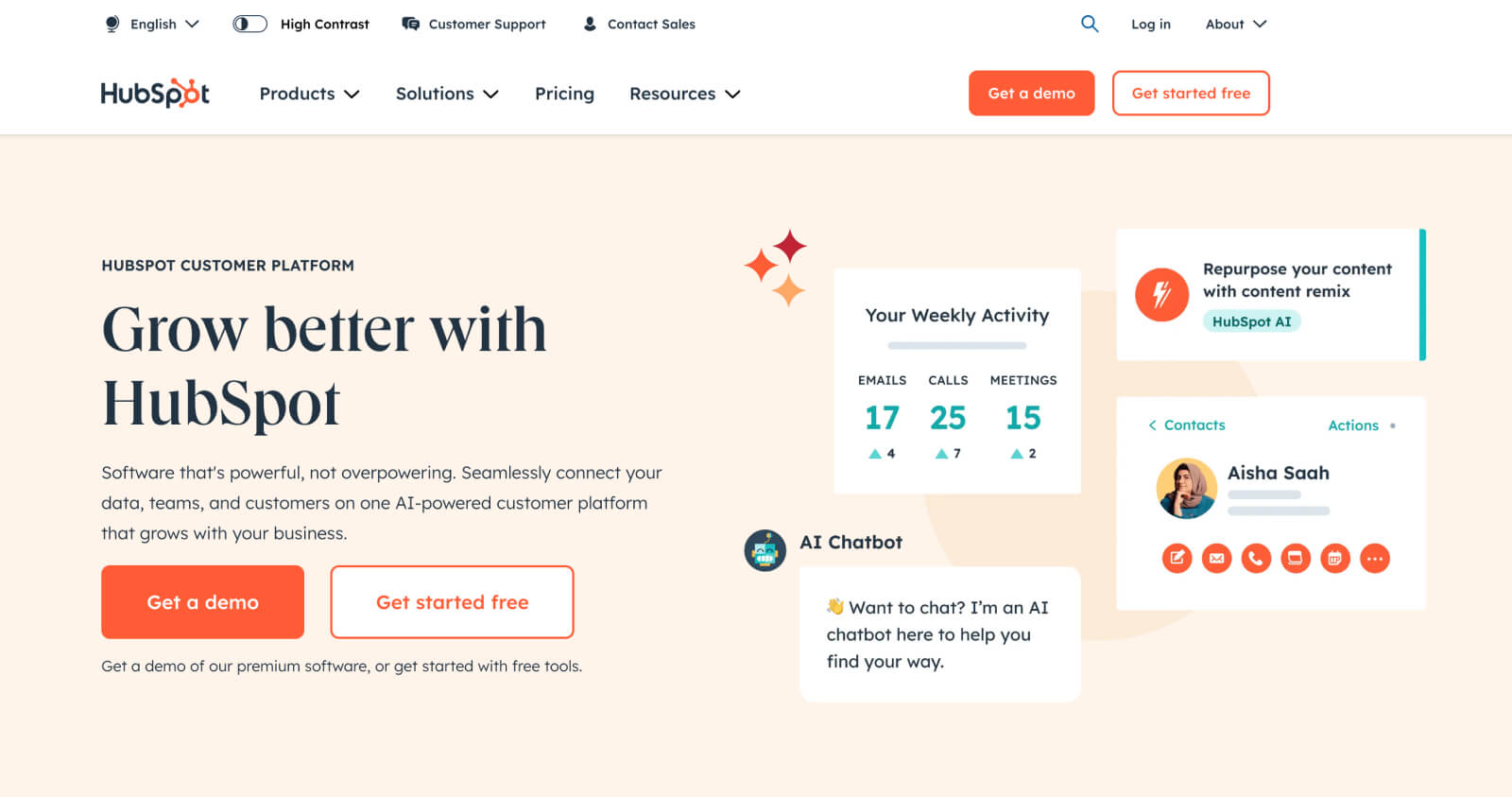
HubSpot website
HubSpot

What is Webflow Enterprise?

Webflow was founded in 2012 with a singular focus: web excellence at scale. Its visual development environment produces production-quality code without requiring manual coding for every change, and Webflow Enterprise extends that model to large organisations - adding governance, security, SLA commitments, and a native AI layer for marketing performance. It is used by Dropbox, Spotify, Monday.com, TED, Docusign, and The New York Times.

Read on in our Webflow Enterprise guide.
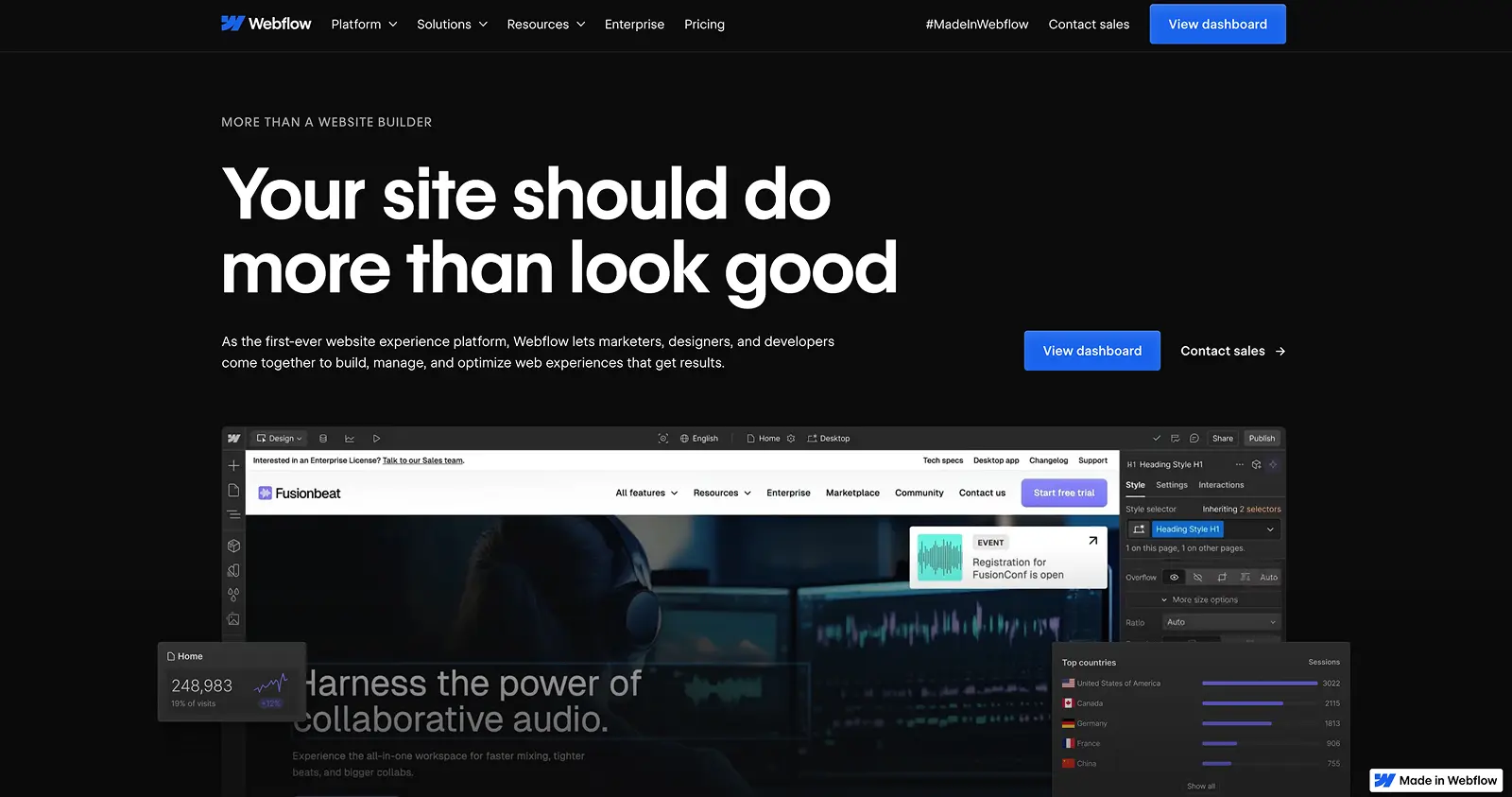
Webflow website
Webflow

The comparison

N4 is both a Webflow Enterprise Partner and a Gold HubSpot Partner. We are not neutral on Webflow - we believe it is the stronger platform for enterprise web. But we are not dismissive of HubSpot either. Where it is genuinely strong, we say so.

01. Design and build speed

HubSpot:

HubSpot's Content Hub offers drag-and-drop templates that make basic landing pages achievable quickly. Anything beyond basic - genuinely custom design, complex component architecture, bespoke interactions - requires HubSpot developer expertise, which is expensive and scarce. The pool of HubSpot CMS developers is small compared to Webflow, which directly affects cost and timeline.

"It generally takes 5-7x longer to develop a website on HubSpot than with Webflow, which results in some eye-watering development invoices."
Jonathan Cook, Platinum HubSpot Partner and N4 Co-founder

Webflow:

Webflow's visual development framework is genuinely faster - not marginally, but structurally. The same project scope that takes months on HubSpot takes weeks on Webflow, because the platform eliminates the gap between design intent and production output. Developers build visually; the platform generates clean, semantic code. Complex, custom, enterprise-grade sites are achievable without the developer overhead HubSpot demands.

Webflow's visual design canvas.

02. The CMS

HubSpot:

HubSpot's CMS is not the company's primary product, and it shows. Dynamic content management is buried in custom menus. Structural page changes require developer involvement. Marketing teams working on HubSpot CMS frequently find themselves dependent on developers for changes that should be self-service.

Webflow:

The advantages of Webflow's CMS are quantifiable. When we helped Serko migrate from HubSpot CMS to Webflow Enterprise, page changes were 13 times faster. That number translates directly into saved time, saved cost, and a marketing team that can act on opportunities without waiting for a development queue to clear.

Webflow's CMS is built for designers, developers, and editors simultaneously. Editors make structural changes on-page in real time. The platform does not require training to operate at a basic level.

03. AI capabilities

This is where the comparison has shifted most meaningfully since 2024, and where the strategic difference between the platforms is sharpest.

HubSpot:

HubSpot has invested genuinely in AI tooling - Breeze AI covers content generation, social media assistance, and CRM-level predictive features. For teams using HubSpot as a full marketing suite, these are real capabilities. For the CMS specifically, HubSpot's AI tools are primarily content assistance features - writing suggestions, SEO recommendations, smart content personalisation. They are additive to the platform rather than architecturally native to how the site performs and converts.

Webflow:

Webflow's AI layer is built into the performance infrastructure of the site. The AI Assistant helps content teams generate and refine copy directly on the canvas. Webflow Optimize's AI-optimised delivery mode dynamically allocates traffic between variants based on real-time visitor behaviour - identifying what converts for each audience segment without manual test configuration. And Webflow Analyze tracks AI referral traffic from ChatGPT, Perplexity, and other answer engines, giving enterprise marketing teams direct visibility into their AEO performance without a separate integration.

HubSpot's AI capabilities are strong for CRM-driven marketing. Webflow's are strong for site performance, conversion, and search visibility. They are not competing for the same job.

04. SEO and AEO

HubSpot:

HubSpot's CMS includes accessible SEO tools - meta fields, basic redirects, and an SEO suggestions panel. For standard requirements this is adequate. For enterprise teams requiring granular control over schema markup, canonical implementation, hreflang for international sites, and systematic AEO optimisation, HubSpot's SEO toolkit has meaningful limitations.

Webflow:

Webflow's native SEO toolkit covers meta tags, canonical tags, 301 redirects, sitemaps, Open Graph data, schema markup, and hreflang - all managed within the platform without plugins. For AEO, Webflow's clean semantic HTML output is the structural foundation that makes content citable by AI answer engines. Combined with CMS-driven schema generation and AI referral tracking in Webflow Analyze, enterprise teams have both the technical infrastructure and the measurement framework to build a genuine AEO programme.

Webflow's built-in SEO features - native, plugin-free, and built for AEO.

05. Enterprise collaboration

HubSpot:

HubSpot's collaboration tools are oriented toward marketing workflows - comments, task assignments, content approvals. For website-specific collaboration - simultaneous design editing, page branching, structured approval workflows for site changes - the toolset is limited. Enterprise teams frequently resort to external project management tools to coordinate website work on HubSpot.
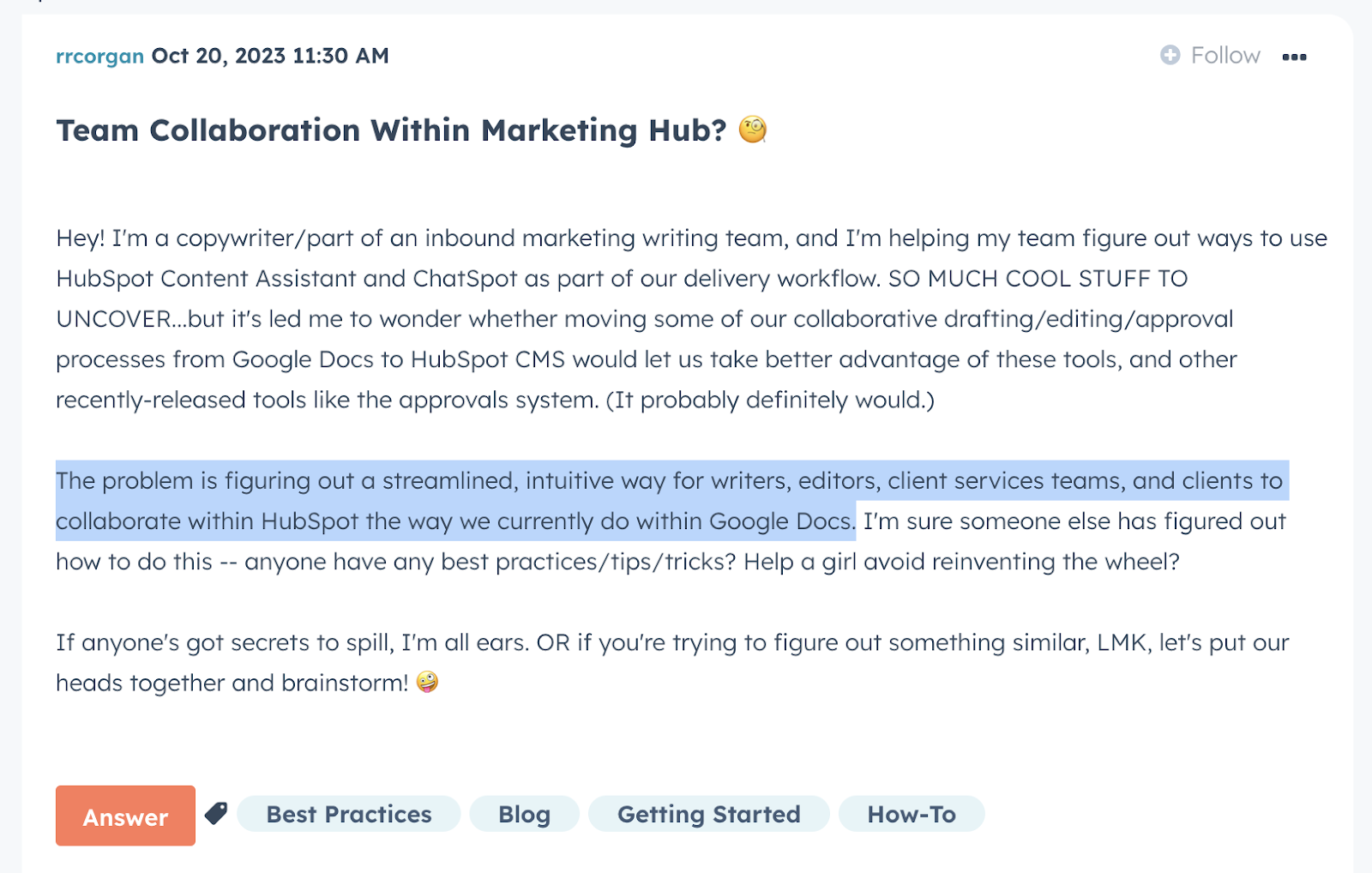
HubSpot community discussion about collaboration limitations
A HubSpot community thread on collaboration limitations

Webflow:

Webflow Enterprise is built for teams. Real-time co-editing, page branching for parallel development, private staging environments, granular role-based permissions, SSO integration, custom approval workflows, and audit logs - all native, all managed within the platform. Multiple designers can work on a site simultaneously without conflicts.

06. Security

HubSpot:

HubSpot provides a managed security infrastructure with automatic updates, SSL, SSO, two-factor authentication, and user access controls. For most enterprise organisations, this is sufficient.

HubSpot's top security features:

HubSpot security controls
HubSpot's web security controls

Webflow:

Webflow is SOC 2 Type II compliant, AWS-hosted, with DDoS protection, SSL, two-factor authentication, role-based permissions, encrypted data storage, and regular third-party penetration testing. For enterprise organisations with stringent IT security requirements, Webflow additionally provides code-level control for custom security implementations. Explore Webflow's Trust Center for the full picture.

Webflow's top security features:

Webflow's backup history log.

07. Pricing

HubSpot:

HubSpot's Content Hub pricing is structured around the full marketing suite. Enterprise tiers include features that many organisations do not need and cannot unbundle. For teams primarily seeking a CMS, the pricing reflects the cost of an entire inbound marketing platform - not just the website tool.
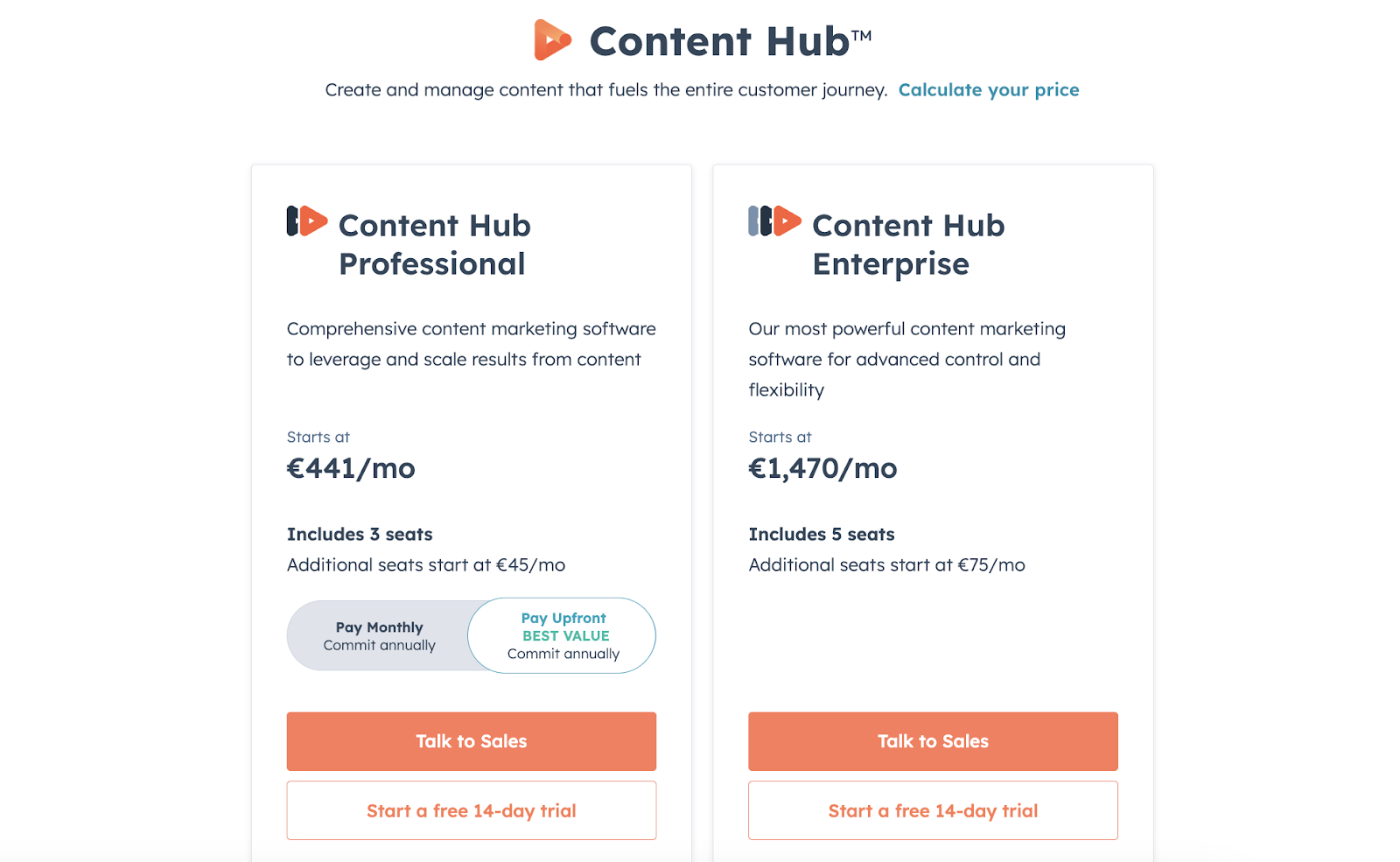
HubSpot Content Hub pricing
HubSpot's Content Hub pricing

Webflow:

Webflow's tiered subscription covers CMS, hosting, CDN, security, and the native AI and analytics toolset in a single cost. Teams that use HubSpot for CRM can integrate HubSpot's marketing tools with Webflow via the native integration - getting the best of both platforms without paying for a CMS they are not fully using. This is, in fact, what many of our clients do.

Wondering what Webflow Enterprise costs for your organisation? Talk to our team.
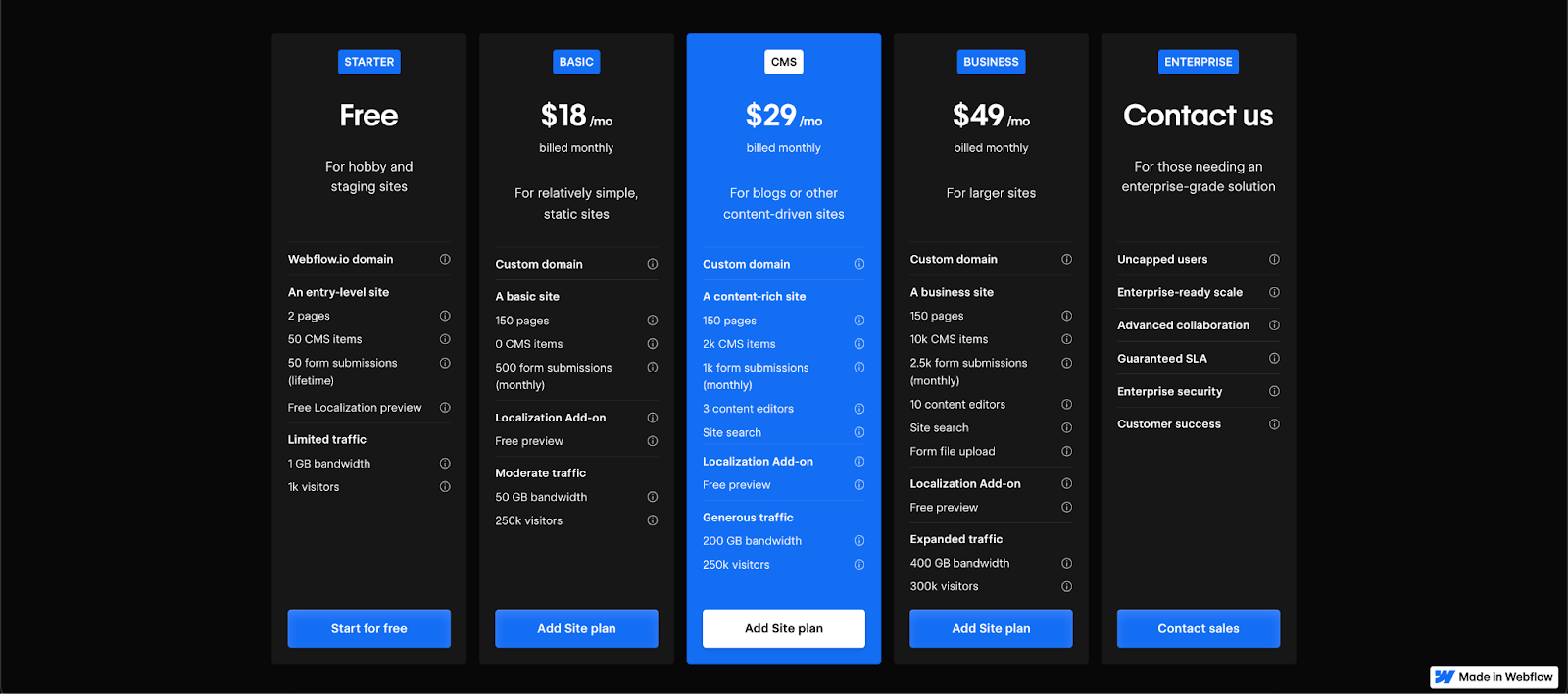
Webflow pricing plans
Webflow pricing

The verdict

HubSpot is a world-class CRM and inbound marketing platform. Its CMS is not its strongest product. For enterprise organisations whose primary requirement is a high-performing, AI-native, marketing-team-friendly website - and who want a CRM they can integrate rather than a bundled tool they are forced to use - Webflow Enterprise is the stronger choice.

The right answer for many organisations is not either/or. Webflow for the site. HubSpot for CRM and marketing automation. Connected via the native integration. That is the configuration we build and support for clients who want the best of both.

Explore more comparisons:

Talk to our team

As Webflow Enterprise Partners and Gold HubSpot Partners, N4 is in a unique position to advise on both platforms - and on how to run them together. If you want an honest recommendation for your organisation's specific situation, get in touch.

Articles
Articles

January 1, 2026

Webflow vs HubSpot CMS: An Honest Expert Review (2026)

N4 is both a Webflow Enterprise Partner and a Gold HubSpot Partner. This is the most credentialled comparison of these two platforms you will find.

Table of contents
00 Min read

Summary

  • HubSpot is the world's leading CRM and inbound marketing platform. Webflow Enterprise is the platform enterprise marketing teams are moving to for web.
  • N4 is both a Webflow Enterprise Partner and a Gold HubSpot Partner. We know both platforms from the inside - this comparison reflects that.
  • This comparison covers design and build speed, functionality, CMS, collaboration, AI capabilities, SEO and AEO, security, and pricing.
  • Questions? Talk to our team.

The honest framing

N4 is both a Webflow Enterprise Partner and a Gold HubSpot Partner. That dual credential is the only reason this comparison is worth reading. We do not have a theoretical view of HubSpot's CMS - we have spent years building on it, migrating clients off it, and integrating it with Webflow. What follows is an honest account of both platforms from a team that has worked deeply across each.

What is HubSpot?

HubSpot is a marketing software company founded in 2006 around the inbound marketing methodology. That mission has expanded into Sales, Commerce, and customer service, but the CMS product - now called Content Hub - remains subordinate to HubSpot's identity as a CRM and marketing platform. Understanding this is essential to understanding why HubSpot's CMS makes the decisions it does.

HubSpot website
HubSpot

What is Webflow Enterprise?

Webflow was founded in 2012 with a singular focus: web excellence at scale. Its visual development environment produces production-quality code without requiring manual coding for every change, and Webflow Enterprise extends that model to large organisations - adding governance, security, SLA commitments, and a native AI layer for marketing performance. It is used by Dropbox, Spotify, Monday.com, TED, Docusign, and The New York Times.

Read on in our Webflow Enterprise guide.

Webflow website
Webflow

The comparison

N4 is both a Webflow Enterprise Partner and a Gold HubSpot Partner. We are not neutral on Webflow - we believe it is the stronger platform for enterprise web. But we are not dismissive of HubSpot either. Where it is genuinely strong, we say so.

01. Design and build speed

HubSpot:

HubSpot's Content Hub offers drag-and-drop templates that make basic landing pages achievable quickly. Anything beyond basic - genuinely custom design, complex component architecture, bespoke interactions - requires HubSpot developer expertise, which is expensive and scarce. The pool of HubSpot CMS developers is small compared to Webflow, which directly affects cost and timeline.

"It generally takes 5-7x longer to develop a website on HubSpot than with Webflow, which results in some eye-watering development invoices."
Jonathan Cook, Platinum HubSpot Partner and N4 Co-founder

Webflow:

Webflow's visual development framework is genuinely faster - not marginally, but structurally. The same project scope that takes months on HubSpot takes weeks on Webflow, because the platform eliminates the gap between design intent and production output. Developers build visually; the platform generates clean, semantic code. Complex, custom, enterprise-grade sites are achievable without the developer overhead HubSpot demands.

Webflow's visual design canvas.

02. The CMS

HubSpot:

HubSpot's CMS is not the company's primary product, and it shows. Dynamic content management is buried in custom menus. Structural page changes require developer involvement. Marketing teams working on HubSpot CMS frequently find themselves dependent on developers for changes that should be self-service.

Webflow:

The advantages of Webflow's CMS are quantifiable. When we helped Serko migrate from HubSpot CMS to Webflow Enterprise, page changes were 13 times faster. That number translates directly into saved time, saved cost, and a marketing team that can act on opportunities without waiting for a development queue to clear.

Webflow's CMS is built for designers, developers, and editors simultaneously. Editors make structural changes on-page in real time. The platform does not require training to operate at a basic level.

03. AI capabilities

This is where the comparison has shifted most meaningfully since 2024, and where the strategic difference between the platforms is sharpest.

HubSpot:

HubSpot has invested genuinely in AI tooling - Breeze AI covers content generation, social media assistance, and CRM-level predictive features. For teams using HubSpot as a full marketing suite, these are real capabilities. For the CMS specifically, HubSpot's AI tools are primarily content assistance features - writing suggestions, SEO recommendations, smart content personalisation. They are additive to the platform rather than architecturally native to how the site performs and converts.

Webflow:

Webflow's AI layer is built into the performance infrastructure of the site. The AI Assistant helps content teams generate and refine copy directly on the canvas. Webflow Optimize's AI-optimised delivery mode dynamically allocates traffic between variants based on real-time visitor behaviour - identifying what converts for each audience segment without manual test configuration. And Webflow Analyze tracks AI referral traffic from ChatGPT, Perplexity, and other answer engines, giving enterprise marketing teams direct visibility into their AEO performance without a separate integration.

HubSpot's AI capabilities are strong for CRM-driven marketing. Webflow's are strong for site performance, conversion, and search visibility. They are not competing for the same job.

04. SEO and AEO

HubSpot:

HubSpot's CMS includes accessible SEO tools - meta fields, basic redirects, and an SEO suggestions panel. For standard requirements this is adequate. For enterprise teams requiring granular control over schema markup, canonical implementation, hreflang for international sites, and systematic AEO optimisation, HubSpot's SEO toolkit has meaningful limitations.

Webflow:

Webflow's native SEO toolkit covers meta tags, canonical tags, 301 redirects, sitemaps, Open Graph data, schema markup, and hreflang - all managed within the platform without plugins. For AEO, Webflow's clean semantic HTML output is the structural foundation that makes content citable by AI answer engines. Combined with CMS-driven schema generation and AI referral tracking in Webflow Analyze, enterprise teams have both the technical infrastructure and the measurement framework to build a genuine AEO programme.

Webflow's built-in SEO features - native, plugin-free, and built for AEO.

05. Enterprise collaboration

HubSpot:

HubSpot's collaboration tools are oriented toward marketing workflows - comments, task assignments, content approvals. For website-specific collaboration - simultaneous design editing, page branching, structured approval workflows for site changes - the toolset is limited. Enterprise teams frequently resort to external project management tools to coordinate website work on HubSpot.

HubSpot community discussion about collaboration limitations
A HubSpot community thread on collaboration limitations

Webflow:

Webflow Enterprise is built for teams. Real-time co-editing, page branching for parallel development, private staging environments, granular role-based permissions, SSO integration, custom approval workflows, and audit logs - all native, all managed within the platform. Multiple designers can work on a site simultaneously without conflicts.

06. Security

HubSpot:

HubSpot provides a managed security infrastructure with automatic updates, SSL, SSO, two-factor authentication, and user access controls. For most enterprise organisations, this is sufficient.

HubSpot's top security features:

  • Standard SSL Certificate
  • Single sign-on (SSO)
  • Two-factor authentication
  • Custom Domain Security Settings
  • Per-page password protection
HubSpot security controls
HubSpot's web security controls

Webflow:

Webflow is SOC 2 Type II compliant, AWS-hosted, with DDoS protection, SSL, two-factor authentication, role-based permissions, encrypted data storage, and regular third-party penetration testing. For enterprise organisations with stringent IT security requirements, Webflow additionally provides code-level control for custom security implementations. Explore Webflow's Trust Center for the full picture.

Webflow's top security features:

  • SOC 2 compliant
  • Verified third-party plugins
  • Two-factor authentication
  • Per-page password protection
  • AWS hosting
  • SSL encryption and custom SSL certificates
  • DDoS protection
Webflow's backup history log.

07. Pricing

HubSpot:

HubSpot's Content Hub pricing is structured around the full marketing suite. Enterprise tiers include features that many organisations do not need and cannot unbundle. For teams primarily seeking a CMS, the pricing reflects the cost of an entire inbound marketing platform - not just the website tool.

HubSpot Content Hub pricing
HubSpot's Content Hub pricing

Webflow:

Webflow's tiered subscription covers CMS, hosting, CDN, security, and the native AI and analytics toolset in a single cost. Teams that use HubSpot for CRM can integrate HubSpot's marketing tools with Webflow via the native integration - getting the best of both platforms without paying for a CMS they are not fully using. This is, in fact, what many of our clients do.

Wondering what Webflow Enterprise costs for your organisation? Talk to our team.

Webflow pricing plans
Webflow pricing

The verdict

HubSpot is a world-class CRM and inbound marketing platform. Its CMS is not its strongest product. For enterprise organisations whose primary requirement is a high-performing, AI-native, marketing-team-friendly website - and who want a CRM they can integrate rather than a bundled tool they are forced to use - Webflow Enterprise is the stronger choice.

The right answer for many organisations is not either/or. Webflow for the site. HubSpot for CRM and marketing automation. Connected via the native integration. That is the configuration we build and support for clients who want the best of both.

Explore more comparisons:

Talk to our team

As Webflow Enterprise Partners and Gold HubSpot Partners, N4 is in a unique position to advise on both platforms - and on how to run them together. If you want an honest recommendation for your organisation's specific situation, get in touch.

Written by

Jonathan Cook

Jonathan Cook

Founder

Tags

Webflow

Versus

Enterprise

SHARE

https://www.n4.studio/blog/webflow-vs-hubspot

Stay ahead with the latest Webflow research and trends.