In Australia and New Zealand, this question comes up more than any other platform comparison we are asked about. A team has run its site on Silverstripe for years. It works, it is secure, and the developers know it well. But marketing wants to move faster, and someone has suggested Webflow. Should they switch?

Both instincts are reasonable. Staying with Silverstripe protects a known, stable system. Moving to Webflow promises a team that can ship without waiting. The right answer depends on what the website is actually for.

We have been designing and building websites for more than ten years, and in that time we have worked across all sorts of CMSs, from open-source frameworks to hosted builders and headless stacks. Today most of our work is on Webflow, where we were named Webflow Agency of the Year in 2026. We have also built on Silverstripe, including large scale healthcare projects, and we have helped several teams move from Silverstripe to Webflow. This piece draws on both sides of that experience.
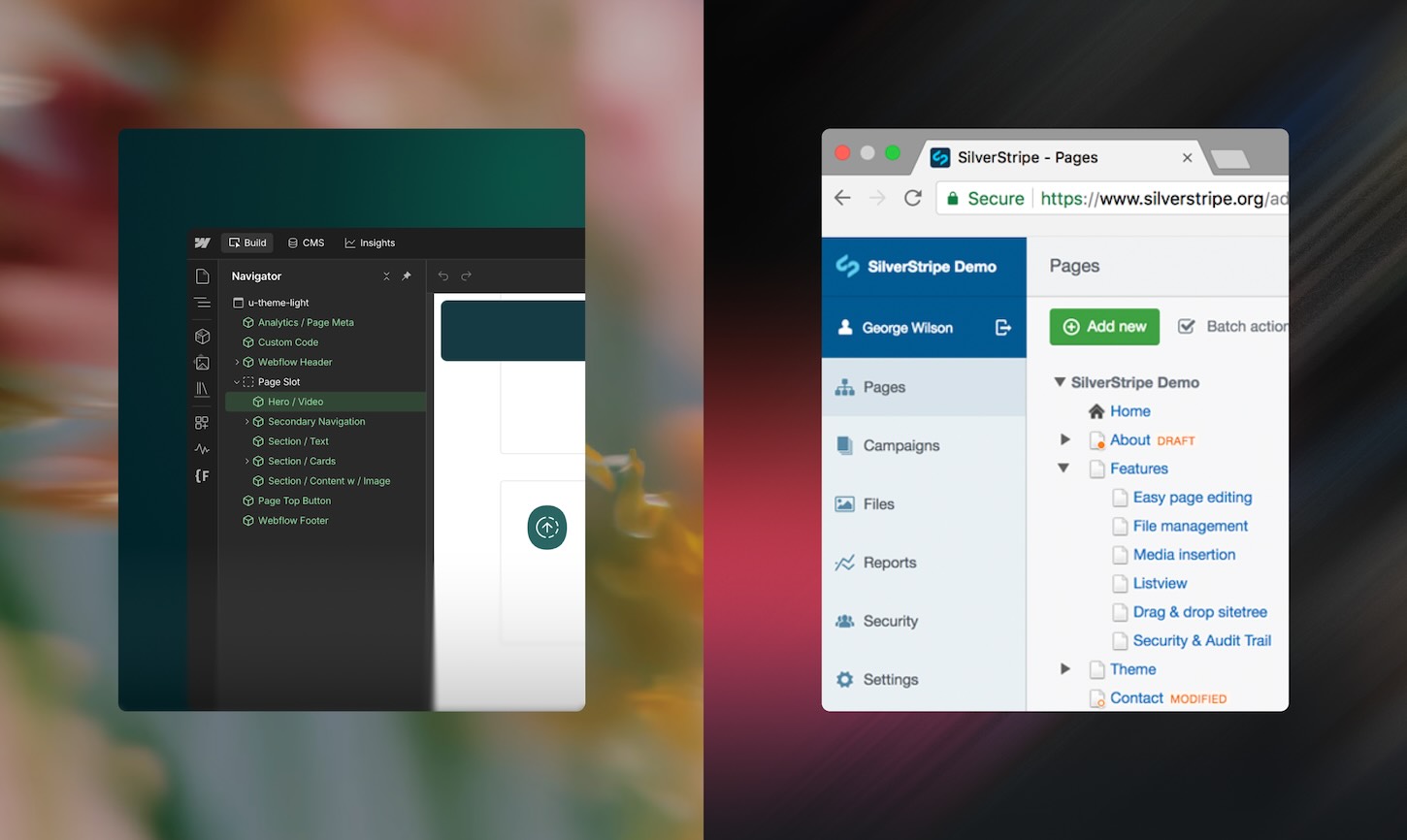
Silverstripe CMS editor (left) beside the Webflow Designer (right).

What Silverstripe does well

Silverstripe has earned its reputation. It was founded in New Zealand in 2000, it is open source, and it has a loyal developer community across Australia and New Zealand, particularly in government, education and the public sector.

Its real strength is that it is a framework first and a CMS second. Underneath the admin sits a well-structured PHP framework, so developers can model complex data, write custom business logic and connect the site to internal systems in ways a hosted platform would not allow. Content can be versioned, page types can be designed around the organisation's own structure, and the code base belongs to you.

It can also be hosted wherever you choose. For organisations with strict data sovereignty or security requirements, being able to run the site on your own infrastructure, or with a local specialist host, is a genuine advantage.

And because the core is open and actively maintained, security issues are reviewed in public and patched through a published release policy. For an in-house team that knows the platform, that is a stable place to work.

What Silverstripe leaves for your team to build and run

The flexibility comes with a condition. Silverstripe gives you a framework and an admin. Almost everything else is yours to build, host and maintain.

The frontend is hand-built in templates by developers. Hosting, the CDN, backups and security patching sit with your team or your host. Forms, search, SEO tooling, analytics, testing and personalisation arrive as modules or third-party services, each with its own setup and upkeep. None of this is a flaw. It is the model.

[Image 2: Stack diagram] Two stacks side by side. Silverstripe: separate boxes for framework, templates, hosting, CDN, analytics, testing and translation. Webflow: one platform box with those inside it. Alt text: Diagram comparing a Silverstripe stack with the Webflow platform.

The practical effect is that the quality of a Silverstripe site tracks the depth of the team behind it. With experienced Silverstripe developers, the ceiling is very high. Without them, the templating system becomes a constraint, and design ambitions get trimmed to what the team can realistically build and maintain.

That matters more as time goes on. The pool of specialist Silverstripe developers is smaller and more regional than it used to be, so losing one or two key people can leave a site that very few others are able to change confidently.

Autonomy, with guardrails

The question we ask every client is simple: who can actually ship a new page today?

On most Silverstripe sites we see, editors can update copy and images inside page types that developers have defined. That works well for steady content. But a new campaign layout, a fresh section or a reordered landing page usually means a new template, so a landing page becomes a ticket, and a ticket becomes a sprint.

Webflow changes where that line sits. We build a component library and a design system up front, so editors assemble new pages from approved sections, directly on the canvas, without touching code. The brand stays intact because the guardrails are built into the components rather than written in a guidelines PDF. Developers stay involved, but on the work that needs them.

"On Silverstripe, marketing teams often know exactly what page they want and still have to wait for a template. On Webflow we put that effort into the system before launch, so building a new page is a decision for marketing, not a request to development."

- Nikola Djuricic, Head of Webflow, N4

Enterprise publishing workflows in Webflow

A website is a growth system, not a content store

The gap between the two platforms has widened most in what happens after a page is published.

Silverstripe offers solid technical SEO foundations for teams with the expertise to use them. Everything beyond that is assembled: analytics from one vendor, A/B testing from another, schema handled by hand or through a module, translation through a separate add-on. Each piece can work well. Together they become a stack someone has to integrate, pay for and keep in step.

Webflow brings most of that into one place. SEO controls, redirects and schema are managed natively. Webflow Optimize runs tests and personalisation, Webflow Analyze shows how people move through the site, including traffic arriving from AI answer engines such as ChatGPT and Perplexity, and Localization handles multiple languages and regions. Together they give a team the tools to keep growing a site after launch. For AEO in particular, clean semantic markup and CMS-driven structured data make it easier to stay visible as more searches end in an AI answer rather than a list of links.
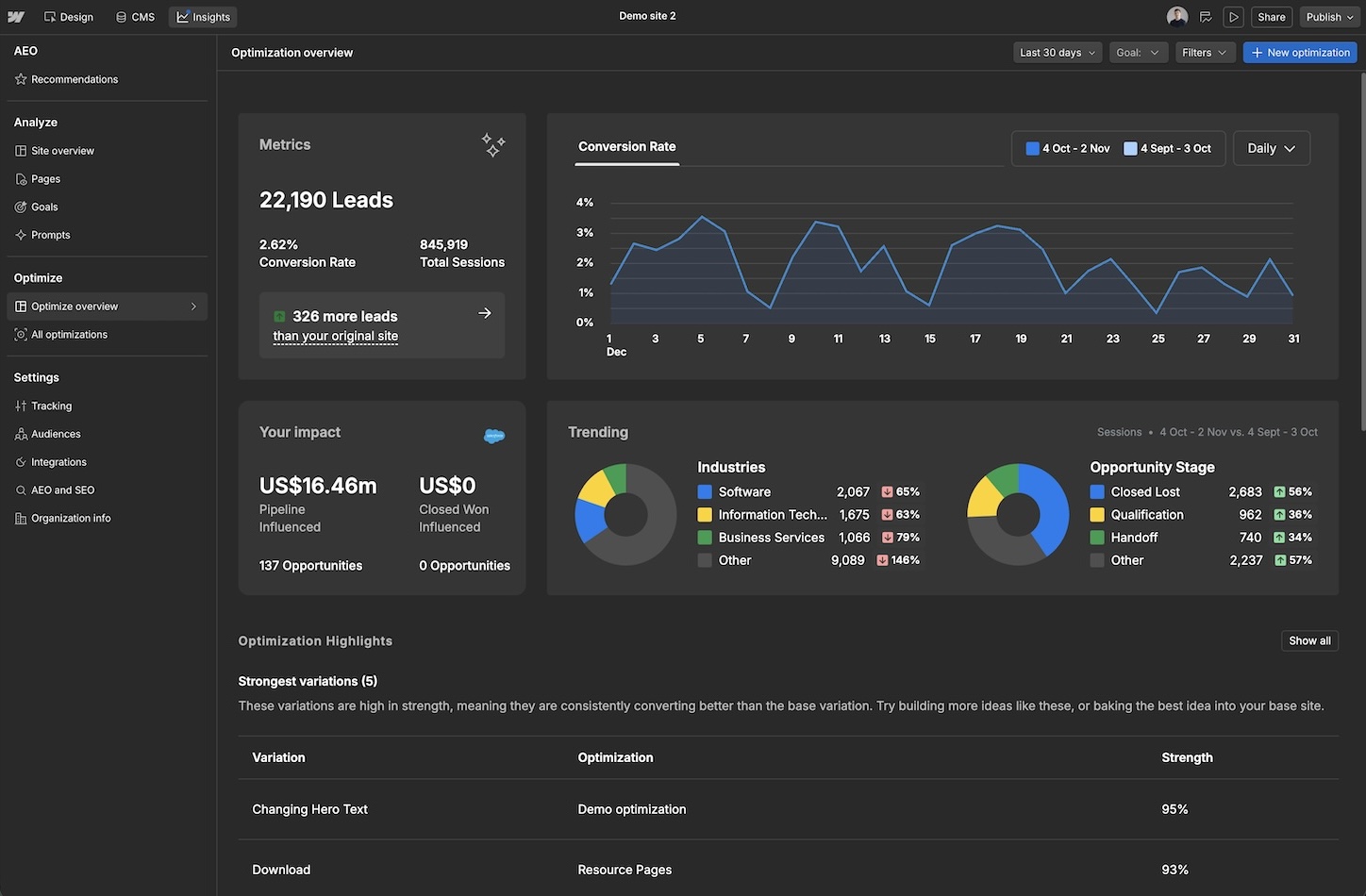
The point is not the feature list. It is that the person writing the page can also see how it performs and test a better version, without a project to stitch the tools together first.

"Growth comes from small improvements made often. When testing, analytics and publishing all live in the same place, the team runs ten experiments a quarter instead of one, and that compounds."

- Lydia Smit, Client & Growth Lead, N4

The quiet cost of running an open-source site

Silverstripe's core is free. That is often where the cost conversation stops, and it is rarely where the cost does. The real comparison happens in year two, not at launch.

An open-source site needs hosting, monitoring, security patches and regular upgrades. Silverstripe publishes a clear release policy, with new minor versions twice a year and major versions every couple of years. That predictability is a strength, but each step is still work. CMS 4 reached end of life in 2025, CMS 6 arrived the same year, and CMS 5 is supported until April 2027. Some older modules are no longer commercially supported in CMS 6 and now rely on the community. For a site with custom modules, every major upgrade is a project in its own right.

Then there is drift. Each campaign that needs a developer adds a little cost and a little delay. Over a few years, those small waits shape what marketing even attempts.

Webflow Enterprise is not cheap, and we would not pretend otherwise. But the investment covers hosting, the CDN, security, backups and platform upgrades, which simply arrive. In our experience the same scope also launches in days rather than months, because layout, interaction and responsive behaviour are built visually rather than coded by hand. When teams add up developer time, hosting, add-on licences and upgrade projects, the total cost of the two is often much closer than the licence line suggests, and sometimes reversed.

When Silverstripe is the right call

We would rather recommend the right tool than the one we happen to build with most. Silverstripe is often the better fit when:

Our own Silverstripe work fits this profile. [Project name] for [client, if cleared] was [precise description: an app, a site, a platform or an internal system], chosen because [the criteria above that applied]. In that context, owning the framework was the point, and a hosted visual platform would have been the wrong tool.

"With Silverstripe, although you're technically limitless, realistically your limits depend on your team's capabilities and expertise."

- Alex Rankin, Technical Lead, N4

How we approach the decision at N4

We start with strategy, not software. Before anyone mentions a platform, we want to understand what the website has to do for the organisation over the next three to five years.

That usually comes down to a handful of questions. Who needs to change the site, and how often? Is it mainly a marketing and publishing site, or does it carry application logic? Which systems does it need to talk to? What will growth look like: more campaigns, more markets, more languages? And who will look after it in year two, once the launch team has moved on?

From there we shape the content model and the design system, because those carry over whichever platform is chosen. The platform choice tends to follow naturally. When it points to Webflow and a team is coming from Silverstripe, we plan the migration carefully: mapping page types to CMS collections, preserving URLs with redirects, and training editors so they are confident from day one. When it points to staying on Silverstripe, we say so.

Frequently asked questions

Q: What is the main difference between Webflow and Silverstripe?

A: Silverstripe is an open-source PHP framework and CMS that developers build on and you host yourself. Webflow is a hosted visual platform where design, content, hosting and growth tools live together, so marketing teams can build and publish pages without code.

Q: Can our marketing team manage the site themselves in Webflow?

A: Yes. With a well-built component library, editors can create new pages from approved sections and publish directly, while the design system keeps everything on brand. Developers are still needed for integrations and new components, not for every page.

Q: How hard is it to migrate from Silverstripe to Webflow?

A: Most of the work is planning rather than moving content. Page types are mapped to CMS collections, content is imported, and every existing URL is redirected to protect search rankings. Sites with heavy custom application logic need more thought, and sometimes that logic is better kept in a separate service.

Q: Can developers still extend Webflow?

A: Yes. Developers can add custom code, connect external systems through Webflow's APIs, and build custom elements and apps. The difference is that they extend a managed platform rather than maintain the whole stack.

Q: Which is better for SEO and AEO?‍

A: Both can perform well. Silverstripe gives skilled teams solid technical foundations, while Webflow handles SEO settings, redirects and structured data natively and can track traffic arriving from AI answer engines, which makes good practice easier to sustain across a large site.

Choosing with clarity

Neither platform is wrong in general. Silverstripe has served many organisations well for a long time, and for sites that behave like software, it still does. Webflow is built for a different job: giving the people who own the message the means to shape it, test it and grow it.

If you are weighing up a move from Silverstripe, or just want a second opinion on what your website needs next, we would be glad to talk it through. Get in touch.

Articles
Articles

January 22, 2026

Webflow vs Silverstripe: What Building on Both Has Taught Us

Webflow or Silverstripe? N4 has built on both, from Webflow Enterprise sites to custom applications on Silverstripe. An honest look at where each wins.

Table of contents
00 Min read

Summary

After more than ten years building on all sorts of CMSs, Silverstripe and Webflow among them, we find the right choice depends less on the software than on who needs to change the website, and how often.

  • Choose Webflow when marketing needs to design, publish and test pages without raising a development ticket.
  • Choose Silverstripe when the site behaves more like an application, with custom logic, deep integrations or hosting requirements a developer team will own.
  • Open source removes the licence fee, but not the cost of hosting, upgrades and the developers every change depends on.

For most marketing sites, Webflow is the stronger foundation, while Silverstripe earns its place when the website is closer to software.

Note: This is not a feature-by-feature comparison. There are plenty of those already. It is a human view, drawn from the many teams we have worked with and spoken to over the past ten years.

In Australia and New Zealand, this question comes up more than any other platform comparison we are asked about. A team has run its site on Silverstripe for years. It works, it is secure, and the developers know it well. But marketing wants to move faster, and someone has suggested Webflow. Should they switch?

Both instincts are reasonable. Staying with Silverstripe protects a known, stable system. Moving to Webflow promises a team that can ship without waiting. The right answer depends on what the website is actually for.

We have been designing and building websites for more than ten years, and in that time we have worked across all sorts of CMSs, from open-source frameworks to hosted builders and headless stacks. Today most of our work is on Webflow, where we were named Webflow Agency of the Year in 2026. We have also built on Silverstripe, including large scale healthcare projects, and we have helped several teams move from Silverstripe to Webflow. This piece draws on both sides of that experience.

Silverstripe CMS editor (left) beside the Webflow Designer (right).

What Silverstripe does well

Silverstripe has earned its reputation. It was founded in New Zealand in 2000, it is open source, and it has a loyal developer community across Australia and New Zealand, particularly in government, education and the public sector.

Its real strength is that it is a framework first and a CMS second. Underneath the admin sits a well-structured PHP framework, so developers can model complex data, write custom business logic and connect the site to internal systems in ways a hosted platform would not allow. Content can be versioned, page types can be designed around the organisation's own structure, and the code base belongs to you.

It can also be hosted wherever you choose. For organisations with strict data sovereignty or security requirements, being able to run the site on your own infrastructure, or with a local specialist host, is a genuine advantage.

And because the core is open and actively maintained, security issues are reviewed in public and patched through a published release policy. For an in-house team that knows the platform, that is a stable place to work.

What Silverstripe leaves for your team to build and run

The flexibility comes with a condition. Silverstripe gives you a framework and an admin. Almost everything else is yours to build, host and maintain.

The frontend is hand-built in templates by developers. Hosting, the CDN, backups and security patching sit with your team or your host. Forms, search, SEO tooling, analytics, testing and personalisation arrive as modules or third-party services, each with its own setup and upkeep. None of this is a flaw. It is the model.

[Image 2: Stack diagram] Two stacks side by side. Silverstripe: separate boxes for framework, templates, hosting, CDN, analytics, testing and translation. Webflow: one platform box with those inside it. Alt text: Diagram comparing a Silverstripe stack with the Webflow platform.

The practical effect is that the quality of a Silverstripe site tracks the depth of the team behind it. With experienced Silverstripe developers, the ceiling is very high. Without them, the templating system becomes a constraint, and design ambitions get trimmed to what the team can realistically build and maintain.

That matters more as time goes on. The pool of specialist Silverstripe developers is smaller and more regional than it used to be, so losing one or two key people can leave a site that very few others are able to change confidently.

Autonomy, with guardrails

The question we ask every client is simple: who can actually ship a new page today?

On most Silverstripe sites we see, editors can update copy and images inside page types that developers have defined. That works well for steady content. But a new campaign layout, a fresh section or a reordered landing page usually means a new template, so a landing page becomes a ticket, and a ticket becomes a sprint.

Webflow changes where that line sits. We build a component library and a design system up front, so editors assemble new pages from approved sections, directly on the canvas, without touching code. The brand stays intact because the guardrails are built into the components rather than written in a guidelines PDF. Developers stay involved, but on the work that needs them.

"On Silverstripe, marketing teams often know exactly what page they want and still have to wait for a template. On Webflow we put that effort into the system before launch, so building a new page is a decision for marketing, not a request to development."

- Nikola Djuricic, Head of Webflow, N4

Enterprise publishing workflows in Webflow

A website is a growth system, not a content store

The gap between the two platforms has widened most in what happens after a page is published.

Silverstripe offers solid technical SEO foundations for teams with the expertise to use them. Everything beyond that is assembled: analytics from one vendor, A/B testing from another, schema handled by hand or through a module, translation through a separate add-on. Each piece can work well. Together they become a stack someone has to integrate, pay for and keep in step.

Webflow brings most of that into one place. SEO controls, redirects and schema are managed natively. Webflow Optimize runs tests and personalisation, Webflow Analyze shows how people move through the site, including traffic arriving from AI answer engines such as ChatGPT and Perplexity, and Localization handles multiple languages and regions. Together they give a team the tools to keep growing a site after launch. For AEO in particular, clean semantic markup and CMS-driven structured data make it easier to stay visible as more searches end in an AI answer rather than a list of links.

The point is not the feature list. It is that the person writing the page can also see how it performs and test a better version, without a project to stitch the tools together first.

"Growth comes from small improvements made often. When testing, analytics and publishing all live in the same place, the team runs ten experiments a quarter instead of one, and that compounds."

- Lydia Smit, Client & Growth Lead, N4

The quiet cost of running an open-source site

Silverstripe's core is free. That is often where the cost conversation stops, and it is rarely where the cost does. The real comparison happens in year two, not at launch.

An open-source site needs hosting, monitoring, security patches and regular upgrades. Silverstripe publishes a clear release policy, with new minor versions twice a year and major versions every couple of years. That predictability is a strength, but each step is still work. CMS 4 reached end of life in 2025, CMS 6 arrived the same year, and CMS 5 is supported until April 2027. Some older modules are no longer commercially supported in CMS 6 and now rely on the community. For a site with custom modules, every major upgrade is a project in its own right.

Then there is drift. Each campaign that needs a developer adds a little cost and a little delay. Over a few years, those small waits shape what marketing even attempts.

Webflow Enterprise is not cheap, and we would not pretend otherwise. But the investment covers hosting, the CDN, security, backups and platform upgrades, which simply arrive. In our experience the same scope also launches in days rather than months, because layout, interaction and responsive behaviour are built visually rather than coded by hand. When teams add up developer time, hosting, add-on licences and upgrade projects, the total cost of the two is often much closer than the licence line suggests, and sometimes reversed.

When Silverstripe is the right call

We would rather recommend the right tool than the one we happen to build with most. Silverstripe is often the better fit when:

  • The site is closer to a web application, with custom business logic, user accounts or complex data that goes well beyond publishing pages.
  • It needs deep, two-way integrations with internal systems such as CRMs, case management or student records.
  • You have an experienced in-house PHP team, and the content changes steadily rather than through constant campaigns.

Our own Silverstripe work fits this profile. [Project name] for [client, if cleared] was [precise description: an app, a site, a platform or an internal system], chosen because [the criteria above that applied]. In that context, owning the framework was the point, and a hosted visual platform would have been the wrong tool.

"With Silverstripe, although you're technically limitless, realistically your limits depend on your team's capabilities and expertise."

- Alex Rankin, Technical Lead, N4

How we approach the decision at N4

We start with strategy, not software. Before anyone mentions a platform, we want to understand what the website has to do for the organisation over the next three to five years.

That usually comes down to a handful of questions. Who needs to change the site, and how often? Is it mainly a marketing and publishing site, or does it carry application logic? Which systems does it need to talk to? What will growth look like: more campaigns, more markets, more languages? And who will look after it in year two, once the launch team has moved on?

From there we shape the content model and the design system, because those carry over whichever platform is chosen. The platform choice tends to follow naturally. When it points to Webflow and a team is coming from Silverstripe, we plan the migration carefully: mapping page types to CMS collections, preserving URLs with redirects, and training editors so they are confident from day one. When it points to staying on Silverstripe, we say so.

Frequently asked questions

Q: What is the main difference between Webflow and Silverstripe?

A: Silverstripe is an open-source PHP framework and CMS that developers build on and you host yourself. Webflow is a hosted visual platform where design, content, hosting and growth tools live together, so marketing teams can build and publish pages without code.

Q: Can our marketing team manage the site themselves in Webflow?

A: Yes. With a well-built component library, editors can create new pages from approved sections and publish directly, while the design system keeps everything on brand. Developers are still needed for integrations and new components, not for every page.

Q: How hard is it to migrate from Silverstripe to Webflow?

A: Most of the work is planning rather than moving content. Page types are mapped to CMS collections, content is imported, and every existing URL is redirected to protect search rankings. Sites with heavy custom application logic need more thought, and sometimes that logic is better kept in a separate service.

Q: Can developers still extend Webflow?

A: Yes. Developers can add custom code, connect external systems through Webflow's APIs, and build custom elements and apps. The difference is that they extend a managed platform rather than maintain the whole stack.

Q: Which is better for SEO and AEO?‍

A: Both can perform well. Silverstripe gives skilled teams solid technical foundations, while Webflow handles SEO settings, redirects and structured data natively and can track traffic arriving from AI answer engines, which makes good practice easier to sustain across a large site.

Choosing with clarity

Neither platform is wrong in general. Silverstripe has served many organisations well for a long time, and for sites that behave like software, it still does. Webflow is built for a different job: giving the people who own the message the means to shape it, test it and grow it.

If you are weighing up a move from Silverstripe, or just want a second opinion on what your website needs next, we would be glad to talk it through. Get in touch.

Written by

Jonathan Cook

Jonathan Cook

Founder, N4

SHARE

https://www.n4.studio/blog/webflow-vs-silverstripe

Launch a website your audience will love — at speed.